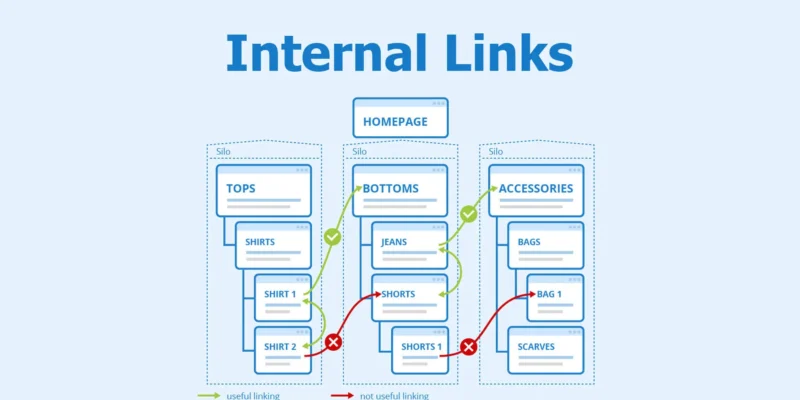
When it comes to search engine optimisation, internal linking is one of the most underrated yet powerful tools available. Many websites focus heavily on external links and backlinks, but forget that internal links for SEO play a crucial role in building site authority, improving user experience, and helping search engines understand the structure of your site.
In this guide, we’ll explain what internal linking is, why it matters, how it differs from external linking, and the best strategies to use. This guide will help you grasp internal linking SEO. It’s useful whether you’re new or want to enhance your current website.
What Are Internal Links?
Internal links are hyperlinks that connect one page of your website to another page on the same domain. These links help users navigate your site and also allow search engines like Google to crawl and index your content more effectively.
For example, if you have a blog post about “email marketing services” and you link to another page titled “best email marketing tips,” that’s an internal link. These links are a core part of internal linking and SEO, and they serve multiple important purposes beyond navigation.
Why Are Internal Links Important for SEO?
Internal linking improves SEO in several key ways:
1. They Help Search Engines Understand Your Site’s Structure
Search engines use links to crawl the internet. When bots land on your site, they follow internal links to discover related pages. This helps Google understand your content hierarchy, context, and topic clusters.
If your internal linking is well-structured, it becomes easier for search engines to index your site. This improves your chances of ranking for relevant search terms and builds a clearer picture of what your website is about.
2. They Pass Authority (Link Equity)
When a high-performing or authoritative page links to another internal page, some of its SEO value — often called link equity — is transferred. This boosts the linked page’s chances of ranking higher in search results.
This concept works similarly to backlinks from other sites. But, in this case, the authority comes from within your domain. That’s why internal link building SEO should be part of your overall strategy, especially if you’re trying to rank newer or lower-traffic pages.
Internal Links vs. External Links
It’s important to understand the difference between internal and external links.
- Internal links: Point to another page on your website.
- External links: Lead to a different website entirely.
Both have SEO benefits, but internal links offer more control. Since they’re within your site, you can decide where to place them, what anchor text to use, and which pages to prioritise.
External links boost credibility and link your content to useful sources. Internal linking SEO guides visitors and search engines through your content in a clear, strategic way.
Types of Internal Links
There are several types of internal links used in websites. Here are the most common:
1. Navigational Links
These are part of your site’s menu, sidebar, or footer and help users move through core areas of the site. They’re essential for user experience, but don’t offer much flexibility in SEO strategy.
2. Contextual Links
These are links placed within the body of your content. They connect relevant articles, services, or product pages. These are the most powerful in terms of internal linking SEO because they signal relationships between pages.
3. Image Links
Sometimes, images are used as clickable elements. While these can link internally, it’s always better to add descriptive text links for SEO purposes.
4. Breadcrumb Links
These show a trail of pages a user has taken, often appearing at the top of a page (e.g., Home > Blog > Article). They help both users and search engines understand page hierarchy.
All these link types contribute to your internal link in SEO efforts. However, contextual links are where you’ll get the most SEO impact.
How to Build Your Internal Linking Strategy
Creating a strong internal link building SEO strategy doesn’t have to be complicated. Here’s a step-by-step approach:
1. Start with a Content Audit
Check your current content. Find your best pages, the ones that aren’t doing well, and the orphaned pages with no internal links. Use tools like Google Search Console or Screaming Frog to map these relationships.
2. Prioritise Contextual Linking
In each blog post or service page, find opportunities to link to related content naturally. For example, if you mention keyword research, you can link to a full guide on the topic, like this one: [backlinks explained from WDA].
Contextual links should be relevant, helpful, and used in moderation. Don’t overstuff keywords or link every other word. Please keep it clean and user-focused.
3. Use Descriptive Anchor Text
Anchor text (the clickable words in a link) helps search engines understand what the linked page is about. Instead of writing “click here,” use something like “learn more about SEO audit strategies.” This improves the clarity and ranking potential of your internal links for SEO.
4. Fix Broken or Redirected Links
Make sure your internal links don’t point to 404 errors or outdated URLs. Use a site audit tool to check for broken links and update them regularly.
Use Authority Pages to Pass Link Equity
Your site likely has a few pages that already rank well and bring in traffic. These are your authority pages. Use them wisely.
When creating new pages or updating older ones, link them from these authority pages using strategic anchor text. This helps pass link equity and gives the new or low-performing pages a chance to gain traction in search results.
This strategy is especially useful when launching new services, blog categories, or landing pages. A single internal link from a well-ranked page can make a noticeable difference.
Final Thoughts
Internal linking and SEO go hand in hand. While many focus on gaining backlinks and external authority, building a strong internal linking structure is often faster, easier, and just as impactful.
When done right, internal linking helps:
- Improve crawlability and site structure
- Pass SEO value between pages
- Boost page views and reduce bounce rate
- Increase the ranking potential of new or important pages
Start by identifying key pages, using relevant contextual links, and always keep user experience in mind. No matter if you’re creating a blog, service page, or product listing, think of each link as a path. With the right strategy, it can guide users and search engines to where you want them.
Need help building a smarter internal linking strategy? Partner with our expert WordPress development agency and take your SEO to the next level.